Transitioning to ME Go.
Statements Guide.
View your interim and 6 monthly statements securely in the ME Go app. {sub-heading}
What to expect.

Find how to read your interim statement here

Receive your statement every 6 months from your account transition date in the ME Go app or Internet Banking.
You will continue to receive your statements the same way you received them before your transition to ME Go.

View your statements.
ME Go app
- Click ‘Profile’ icon on the bottom left of the screen
- Select ‘Statements and documents’
- Select the account you would like to see the statement for
- Request interim statement or choose the time period
- Your statement will be shown in PDF format inside the app
ME Go Internet Banking
- Log in to ME Go Internet Banking.
- Select ‘Statement’s from the left global navigation.
- Select an account from the drop down box.
- Select either the View or Download option.
How to read your ME Go
SpendME interim statement.
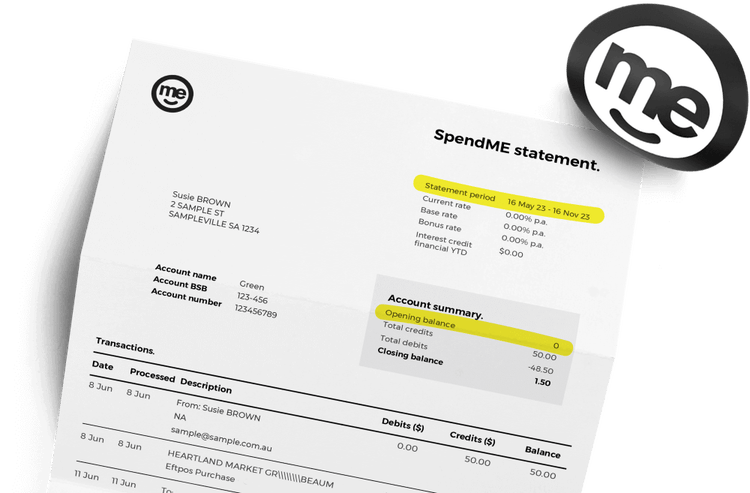
During the month your account transitions to the new ME Go app, your transaction history will be split across two statements. Here is an example of the SpendME interim statement.
Statement period: This is the period from your last periodic statement date to your account transition date.
Opening balance: This is your total account balance transitioned to the ME Go app.
In your following 6 monthly statement, you’ll find transactions from the date of your account transition.
FAQs
What is an Interim statement?
When will I receive my Interim statement?
How many Interim statements will I receive?
For joint accounts, interim statements will be delivered based on the recipients set preferences.
Where can I view my Interim statements?
Your Interim statement will be available in the ME Go App and available within a week after logging into the ME Go app for the first time.
To view and download your statements in the app follow the steps below:
- Click ‘Profile’ icon on the bottom left of the screen
- Select ‘Statements and documents’
- Select the account you would like to see the statement for
- Request interim statement or choose the time period
- Your statement will be shown in PDF format inside the app
Customers who have previously opted in to receive their Everyday Transaction Account, InterestME Savings Account and Online Savings Account via post will continue to receive the interim statements via post.
When will I receive my next periodic statement?
You will receive your ME Go statements every 6 months from your account transition date. You can request an interim statement at any time.
To view and download your statements in the app follow the steps below:
- Click ‘Profile’ icon on the bottom left of the screen
- Select ‘Statements and documents’
- Select the account you would like to see the statement for
- Request interim statement or choose the time period
- Your statement will be shown in PDF format inside the app
How do I make sure my correct balance was transitioned?
Where are my existing statements from my previous ME account?
2 years of your historical transaction statements will be available in the ME Go app and available within a week after logging into the ME Go app for the first time.
To view and download your statements in the app follow the steps below:
- Click ‘Profile’ icon on the bottom left of the screen
- Select ‘Statements and documents’
- Select the account you would like to see the statement for
- Request interim statement or choose the time period
- Your statement will be shown in PDF format inside the app
If you require statements before the 2 years provided, please call the contact centre.
How can I check my bonus interest is correct when I moved to ME Go?
From your account transition date, you will earn bonus interest for two months on ME.
To continue to receive the bonus interest after two months, you will need to meet the new Bonus Criteria below. We recommend from your Go Day you start to meet the criteria to avoid missing a month of bonus criteria.
New bonus criteria in ME Go: Make four settled card transactions in a (any) calendar month on any SpendME Transaction Account in your name (or joint names for jointly held accounts), to be eligible to earn bonus interest in the next calendar month, with bonus interest paid on the 1st day of the following month.
Why did I get bonus interest without using my new replacement Visa Debit Card?
To continue to receive the bonus interest, you will need to meet the new Bonus Criteria below. We recommend from your Go Day you start to meet the criteria to avoid missing a month of bonus criteria.
New bonus criteria in ME Go: Make four settled card transactions in a (any) calendar month on any SpendME Transaction Account in your name (or joint names for jointly held accounts), to be eligible to earn bonus interest in the next calendar month, with bonus interest paid on the 1st day of the following month. Please note, you will receive bonus interest for two months and to continue to receive the bonus interest, you will need to meet the criteria explained above. We recommend from your Go Day you start to meet the criteria to avoid missing a month of bonus criteria.