Latest alerts.
Be alert to the newest scam alerts.{sub-heading}
Contact ME
To report a fraud or scam, give ME a call immediately.

If in doubt, call ME
13 15 63
Monday to Friday 8am–8pm (AEDT)
Saturday 9am–5pm (AEDT)
+61 3 9708 4001 if overseas
ME Bank Impersonation Scam
October 2026
We’re seeing a rise in bank impersonation scams, where customers are receiving calls from someone claiming to be from the ME Fraud Team or ME Bank Head Office.
The caller introduces themselves as ‘Peter Steel’ and claims there has been:
- A suspicious transaction,
- A suspicious sign‑in on your account, or
- A reference to a recent card compromise and an offer to help.
Customers may also receive SMS messages that appear to reference fraud investigations, account activity or card compromises to make the scam appear legitimate before receiving a follow-up phone call.
Scammers will then ask you to provide card details, the One-Time-Pin (OTP) sent to your phone or sensitive personal information such as the codes to your banking app.
How to Identify and Avoid Bank Impersonation Scams:
- Unexpected Contact: Be cautious of all calls claiming to be from ME or other banks.
- Identification Questions: Scammers will try to obtain your identification information, card details, OTP sent to your phone, and the answers to your security questions. They may use scare tactics if you refuse to answer.
- Check the Source: If unsure about the authenticity of a call, hang up and contact ME directly using the public number on our website.
If You Suspect a Bank Impersonation:
- Do Not Engage: If you receive an unsolicited email or phone call, do not click on any links or provide any identification information or OTPs.
- Stay Calm: Scammers may use scare tactics to get you to engage, such as claiming there has been a large unauthorised transaction or a suspicious sign-in on your account. Always contact ME through official channels so the fraud team can assess your accounts.
- Report It: Contact ME to report the incident. We can provide further advice and support to help you avoid the scam and protect yourself.
If in doubt, contact ME:
To report a fraud or scam, call us immediately on 13 15 63, 24 hours, 7 days a week.
If you have any concerns about the legitimacy of correspondence, or individuals, you can contact ME Bank directly using the details on our Report fraud or scams page.
Report a cybercrime or cyber security incident to the ACSC via Report Cyber at www.cyber.gov.au/report, or call the Australian Cyber Security Hotline on 1300 CYBER! (1300 292 371).
For more tips and resources, visit: https://www.mebank.com.au/support/security/reporting-scams/
ME Bank Impersonation Scam
July 2026
We’re seeing a rise in bank impersonation scams, where customers are receiving calls from someone claiming to be from the ME Go Fraud Team or ME Go Head Office.
The caller introduces themself and claims there has been:
- A suspicious transaction,
- A suspicious sign in on your account, or
- A reference to a recent card compromise and an offer to help.
Scammers will then ask you to provide card details, the One-Time-Pin (OTP) sent to your phone or sensitive personal information such as the codes to your banking app.
How to Identify and Avoid Bank Impersonation Scams:
- Unexpected Contact: Be cautious of all calls claiming to be from ME or other banks.
- Identification Questions: Scammers will try to obtain your identification information, card details, OTP sent to your phone, and the answers to your security questions. They may use scare tactics if you refuse to answer.
- Check the Source: If unsure about the authenticity of a call, hang up and contact ME directly using the public number on our website.
If You Suspect a Bank Impersonation:
- Do Not Engage: If you receive an unsolicited email or phone call, do not click on any links or provide any identification information or OTPs.
- Stay Calm: Scammers may use scare tactics to get you to engage, such as claiming there has been a large unauthorised transaction or a suspicious sign-in on your account. Always contact ME through official channels so the fraud team can assess your accounts.
- Report It: Contact ME to report the incident. We can provide further advice and support to help you avoid the scam and protect yourself.
If in doubt, contact ME:
To report a fraud or scam, call us immediately on 13 15 63, 24 hours, 7 days a week.
If you have any concerns about the legitimacy of correspondence, or individuals, you can contact ME Bank directly using the details on our Report fraud or scams page.
Report a cybercrime or cyber security incident to the ACSC via Report Cyber at www.cyber.gov.au/report, or call the Australian Cyber Security Hotline on 1300 CYBER! (1300 292 371).
For more tips and resources, visit: https://www.mebank.com.au/support/security/reporting-scams/
ME Website Impersonation Scam
July 2026
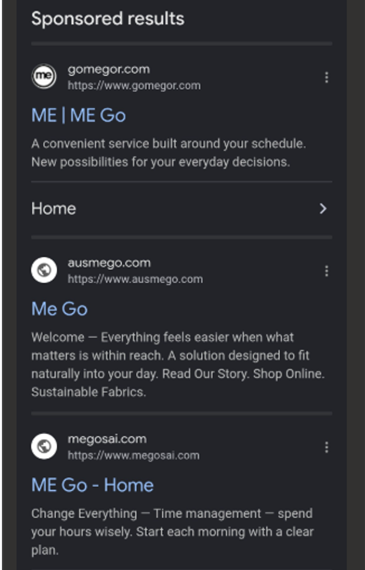
ME Bank is warning customers about fraudulent websites impersonating ME that are appearing in sponsored search engine results.
- Appears as a "Sponsored" search result
- Uses fake or similar-looking web addresses
- Prompts users to log in or enter personal details
- Does not direct to the official mebank.com.au domain
These websites are not legitimate.
[br]
How to Identify and Protect Yourself
- Always access ME via mebank.com.au
- Avoid clicking on sponsored or unfamiliar links
- Never enter banking details on unverified websites
If in doubt, contact ME:
To report a fraud or scam, attend your local branch or call us immediately on 13 15 63. (Monday-Friday, 8am-8pm AEST, and Saturday 9am-5pm AEST).
If you have any concerns about the legitimacy of correspondence, or individuals, you can contact ME group directly.
Report a cybercrime or cyber security incident to the ACSC via ReportCyber at www.cyber.gov.au/report, or call the Australian Cyber Security Hotline on 1300 CYBER! (1300 292 371).
For more tips and resources, visit: https://www.mebank.com.au/support/security/reporting-scams/
ME Bank Impersonation Scam
April 2026
We’re seeing a rise in bank impersonation scams, where ME customers are receiving SMS and phone calls from someone claiming to be from the ME Go Fraud Team or ME Go Head Office.
The callers introduce themselves as ‘Michael Andrews’ or ‘Andy Cook’ and claims there has been:
- A suspicious transaction with merchants like Temu or other online retailers,
- A suspicious sign‑in on your account, or
- A reference to a recent card compromise and an offer to help.
Scammers may even reference a recent card compromise and claim to be able to assist you.
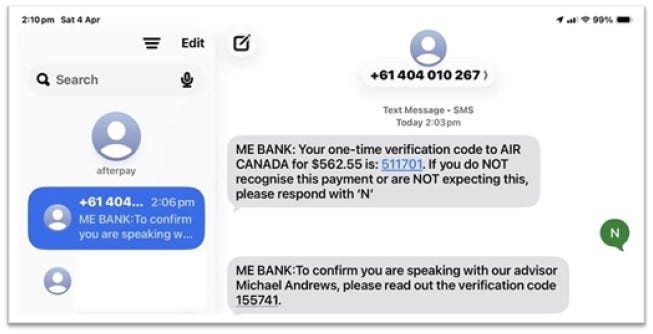
This contact often follows after an initial phony message to the victim claiming to provide a verification code for a payment attempt, as in the image below. The scammer will then ask you to share this code to with them, often under the disguise that it is to ‘verify’ you. All these messages are not from ME.
[br]
If You Suspect a Bank Impersonation:
- Do Not Engage: If you receive an unsolicited email or phone call, do not click on any links or provide any identification information or One-Time PINs(OTP).
- Stay Calm: Scammers may use scare tactics to get you to engage, such as claiming there has been a large unauthorised transaction or a suspicious sign-in on your account. Always contact ME through official channels so the fraud team can assess your accounts.
- Report It: Contact ME to report the incident. We can provide further advice and support to help you avoid the scam and protect yourself.
If in doubt, contact ME:
To report a fraud or scam, call us immediately on 13 15 63, 24 hours, 7 days a week.
If you have any concerns about the legitimacy of correspondence, or individuals, you can contact ME Bank directly https://www.mebank.com.au/support/security/reporting-scams/.
Report a cybercrime or cyber security incident to the ACSC via Report Cyber at www.cyber.gov.au/report, or call the Australian Cyber Security Hotline on 1300 CYBER! (1300 292 371).
For more tips and resources, visit: https://www.mebank.com.au/support/security/reporting-scams/
Footy Season Ticket Scams
March 2026
Football season is about to kick off for the year and ME is reminding customers to stay alert for ticket scams, particularly “goods not received” scams involving fake tickets.
Scammers often advertise tickets for sold-out or high-demand games on social media pages like Facebook Marketplace, including in the comment sections. They may pressure you to pay quickly and then disappear once you’ve transferred the money.
Last year, Criminals Australians lost more than $36 million to this type of scam.
How to spot and avoid ticket scams
Buy only from official sources
- The best way to avoid fake tickets is to purchase through authorised ticket sellers listed on the official club, stadium, or competition website.
- Be cautious of look-alike websites and always check you’re on the legitimate ticket portal (not a third-party copycat site).
Be wary of social media ticket offers
Scammers may:
- Pretend to be a genuine seller
- Use compromised accounts (including accounts that look like friends or community members)
- Contact people directly who post that they’re looking for tickets
Look out for common red flags Tickets are heavily discounted or “too good to be true”
- Seller profile is new, has no history, or very few friends/followers
- Vague details, refusal to provide proof, or excuses to avoid meeting/verification
- Pressure to pay immediately e.g.“someone else is about to buy them”.
Avoid risky payment methods
Be extra cautious if asked to pay via:
- Bank transfer
- Cryptocurrency
- PayPal Friends & Family
- Gift cards
Use safer payment options
If you choose to buy second-hand, use payment methods with buyer protection (where possible), and avoid paying outside secure platforms.
If you think it’s a scam
- Do not proceed with payment
- Report it to Scamwatch: https://www.scamwatch.gov.au/
- Report the listing to the platform (e.g., Facebook Marketplace)
- For Australian consumer scam reports, you can also report via the ACCC/Scamwatch channels above
If in doubt, contact ME to report a fraud or scam, call us immediately on 13 15 63, 24 hours/day, 7 days a week.
If you have any concerns about the legitimacy of correspondence, or individuals, you can contact ME directly https://www.mebank.com.au/support/security/reporting-scams/
Report a cybercrime or cyber security incident to the ACSC via Report Cyber at www.cyber.gov.au/reportor call the Australian Cyber Security Hotline on 1300 CYBER! (1300 292 371).
For more tips and resources, visit: https://www.mebank.com.au/support/security/
ME Bank Impersonation Scam
January 2026
We’re seeing a rise in bank impersonation scams, where customers are receiving calls from someone claiming to be from the ME Go Fraud Team or ME Go Head Office.
The caller introduces himself as Victor and claims there has been:
- A suspicious transaction with merchants like Temu or other online retailers,
- A suspicious sign in on your account, or
- A reference to a recent card compromise and an offer to help.
Scammers may even reference a recent card compromise and claim to be able to assist you.
If You Suspect a Bank Impersonation:
- Do Not Engage: If you receive an unsolicited email or phone call, do not click on any links or provide any identification information or OTPs.
- Stay Calm: Scammers may use scare tactics to get you to engage, such as claiming there has been a large unauthorised transaction or a suspicious sign-in on your account. Always contact ME through official channels so the fraud team can assess your accounts.
- Report It: Contact ME to report the incident. We can provide further advice and support to help you avoid the scam and protect yourself.
If in doubt, contact ME:
To report a fraud or scam, call us immediately on 13 15 63, 24 hours, 7 days a week.
If you have any concerns about the legitimacy of correspondence, or individuals, you can contact ME Bank directly https://www.mebank.com.au/support/security/reporting-scams/.
Report a cybercrime or cyber security incident to the ACSC via Report Cyber at www.cyber.gov.au/report, or call the Australian Cyber Security Hotline on 1300 CYBER! (1300 292 371).
For more tips and resources, visit: https://www.mebank.com.au/support/security/reporting-scams/
Keep ME alert.
September 2025 – International Number Spoofed by Scammers
How to identify the scam call:
Scammers are calling under the guise of preventing fraudulent transactions on the account.
Callers will ask for account sensitive information such as passwords, card numbers, log details and pins under the guise of completing identity verification.
Scammers may request for you to download remote access software.
We do not call customers from this international number.
What to do if you suspect a scam?
If you’re ever unsure please terminate the call and contact us on 13 15 63 to confirm if the caller is actually an employee.
If you have provided remote access, please disconnect your device from the internet and contact us on 13 15 63 immediately.
If we call you, we will never ask you for any one time pins and will never ask you for your full card number.
Block suspect callers and cease any interactions with the caller.
If you have any further questions or concerns please don’t hesitate to give us a call on 13 15 63.
Report a cybercrime or cyber security incident to the ACSC via ReportCyber at www.cyber.gov.au/report, or call the Australian Cyber Security Hotline on 1300 CYBER! (1300 292 371)
July 2025 - Qantas Cyber Incident
ME Bank has been made aware of a recent cybersecurity event affecting Qantas, which has led to the unauthorised disclosure of certain customer details, including names, email addresses, and phone numbers. If you are a Qantas customer, please exercise caution, as this information may be exploited in phishing or social engineering scams.
Increased Risk of Scams
The compromised data may be used by scammers to conduct targeted phishing or impersonation attempts. These scams often appear credible and aim to extract sensitive information.
What to look out for:
Be wary of unexpected communications—calls, texts, or emails—claiming to be from Qantas.
Avoid clicking on suspicious links or downloading unknown attachments.
Do not disclose personal or financial information to unfamiliar contacts.
Reporting Suspicious Behaviour:
If you receive a message pretending to be from Qantas, report it through their official support channels.
If you’ve shared sensitive details or transferred funds in response to such a message, contact ME Bank immediately at 13 15 63 (Mon–Fri 8am–8pm AEST, Sat 9am–5pm AEST) or visit your local branch.
You can also report cybercrime to the Australian Cyber Security Centre (ACSC) via ReportCyber or by calling 1300 CYBER1 (1300 292 371).
Stay Updated:
For the latest information on the Qantas incident, visit: Qantas Cyber Incident Information
For ME Bank’s current scam alerts and fraud prevention advice, visit: ME Bank Fraud and Scams Support
April 2025 – Bank Impersonation Scam
We’ve been alerted to an increase in bank impersonation scams. Customers have reported receiving calls claiming to be from the “ME Bank Fraud Team” OR “ME Bank Head Office”. During these calls, scammers mention a “suspicious transaction” or a “suspicious sign-in” on your account. They may even reference a recent card compromise and claim to be able to assist you. They will then ask you to provide card details, the One-Time-Pin (OTP) sent to your phone or sensitive personal information such as the codes to your banking app.
What to look out for:
- Unexpected Contact: Be cautious of all calls claiming to be from ME or other banks.
- Identification Questions: Scammers will try to obtain your identification information, card details, OTP sent to your phone, and the answers to your security questions. They may use scare tactics if you refuse to answer.
- Check the Source: If unsure about the authenticity of a call, hang up and contact ME directly using the public number or email fraudandscamoperations@boq.com.au.
If You Suspect a Bank Impersonation Scam Call:
- Do Not Engage: If you receive an unsolicited call, do not provide any identification information or OTPs. End the call and contact the bank using the numbers listed on the public website.
- Stay Calm: Scammers may use scare tactics to get you to engage, such as claiming there has been a large unauthorised transaction or a suspicious sign-in on your account. Always contact ME through official channels so the fraud team can assess your accounts.
- Report It: Contact ME to report the incident. We can provide further advice and support to help you avoid the scam and protect yourself.
If in doubt, contact ME:
If you think your account details or card details have been disclosed to a scammer, or if you receive a verification code that you didn't request call ME immediately on 13 15 63, we are available 24/7.
Alternatively, you can contact ME directly either via melb.fraudgroup@boq.com.au or get in touch using the details on our Contact ME page.
Report a cybercrime or cyber security incident to the ACSC via ReportCyber at www.cyber.gov.au/report, or call the Australian Cyber Security Hotline on 1300 CYBER! (1300 292 371).
February 2025 – ME Bank Impersonation scam
We have been alerted to a new impersonation scam. It involves a scammer who contacts customers and claims that suspicious transactions are being attempted on their ME card or account.
Customers have reported that scammers impersonating ME may:
- Claim to work in the ME fraud or security team.
- Use spoofing technology to appear to be calling from a number similar to a genuine ME phone number (e.g. 1 digit difference, or matching 8 digit number with the wrong 2 -digit state code).
- Have a British accent.
- Use a customer’s mobile number to generate a ME GO verification code (even if they do not hold a ME GO account).
- Claim that a customer has been impacted by a Booking.com data breach and that Booking.com transactions are being attempted with their details.
- Know the customer’s card details (from a third-party data breach or a past phishing incident).
- Request a customer’s account balance(s) so they know how much they can attempt to target.
- Use the customer’s card details to generate SMS or email verification codes and then ask for these codes to ‘stop’ suspicious transactions (when, in fact, this is what they need to complete the transactions/scam).
- Request other card numbers, login details and codes to ‘resolve’ the security issue.
What to look out for:
- A text message, email or a call that may allude to a security compromise or transaction but not provide specific or accurate information.
- Callers who claim to require SMS or email codes to stop fraudulent transactions.
- People who request your Customer ID and Access Code to secure your account, or guide you through the self-service reset process and then tell you a new Access Code to choose.
- Someone who asks you to transfer funds between your accounts or to a new payee account for safekeeping.
- Threats that you will be liable for loss if you do not cooperate by providing codes or account access.
- Urgency is emphasised. This is so the scammers can pressure you to provide your details or convince you to do something quickly.
How to protect yourself:
- Never provide your internet banking details or one-time codes over the phone. ME will never contact you and ask for them.
- Never provide other sensitive information to anyone over the phone, especially during a call that you did not initiate.
- Always call a trusted number to confirm whether you’re actually speaking with the organisation or company that says they are calling.
- If you receive an unexpected SMS, do not click any links or provide any personal or banking information.
- If directed to call your bank, always call ME on 13 15 63 or get in touch using the other details listed on our ‘Contact us’ page.
If in doubt, contact ME:
If you think your account details or card details have been disclosed to a scammer, or if you receive a verification code that you didn't request call ME immediately on 13 15 63, we are available 24/7.
Alternatively, you can contact ME directly either via melb.fraudgroup@boq.com.au or get in touch using the details on our Contact ME page.
Report a cybercrime or cyber security incident to the ACSC via ReportCyber at www.cyber.gov.au/report, or call the Australian Cyber Security Hotline on 1300 CYBER! (1300 292 371).
December 2024 – Online Shopping Scams
As we approach the festive season, it’s important to stay vigilant against scams and fraud. Scammers take advantage of the festive season to imitate genuine brands, websites and delivery services. Shopping scams remain a significant threat, exposing individuals and businesses to risks through fake product listings, deceptive payment requests, and insecure payment avenues.
If you receive suspicious emails or messages, refrain from clicking any links or providing card details. Exercise caution with online shopping deals; if it seems too good to be true, it probably is!
Warning signs:
- Be wary of online advertisements that mimic a genuine retailer that are offering deals that seem too good to be true.
- Requests for payments via bank transfer or virtual currencies.
- Emails and messages regarding undelivered items or fees required for a ‘failed’ delivery.
- Be cautious of unsolicited emails, phone calls, or messages asking for personal or financial information. Scammers often pose as legitimate organisations.
Shop online securely:
- Shop from reputable online retailers.
- Verify the authenticity of any communication you receive. Always contact the organisation directly using official contact details rather than those provided in the suspicious message.
- Safeguard your payment information by refraining from saving your payment information to the web browser or online accounts.
- Regularly check your bank statements and credit reports for any unusual activity. Early detection can help prevent further fraud.
- Update your passwords and use strong, unique passwords for different accounts. Enable two-factor authentication where possible.
If in doubt, contact ME:
To report a fraud or scam, call ME immediately on 13 15 63, we are available 24/7.
Alternatively, you can contact ME directly either via melb.fraudgroup@boq.com.au or get in touch using the details on our Contact ME page.
Report a cybercrime or cyber security incident to the ACSC via ReportCyber at www.cyber.gov.au/report, or call the Australian Cyber Security Hotline on 1300 CYBER! (1300 292 371).
November 2024 – Job Scams: Protect Yourself from Fake Employment Offers
ME is warning customers about a surge in job scams, where fraudsters pose as legitimate employers to deceive job seekers. According to ScamWatch data for 2024, job-related scams have become one of the most common types of fraud this year, with Australians losing a staggering $8,536,115.00 to these scams so far. This figure is based on just 2,400 reported incidents, so the total losses are likely much higher, as many scams go unreported.
Scammers often target job seekers through platforms such as LinkedIn, Instagram, email, social media, messaging apps, and job boards. These fraudulent offers can appear convincing, with scammers claiming to represent well-known companies.
Scammers often lure victims with promises of high-paying, flexible, or work-from-home roles. Some of these "opportunities" might even claim to pay commissions for engaging with social media posts. They may request sensitive personal details like your full name, date of birth, address, or even financial information. In some cases, they also ask for upfront payments for supposed background checks, training, or equipment—all clear red flags of a scam.
How to Identify and Avoid Job Scams
- Too Good to Be True: If a job offer seems too good to be true (e.g., unusually high salaries for little work), it probably is. Scammers often lure victims with promises of easy money or unrealistic benefits.
- Unsolicited Job Offers: Be cautious if you receive a job offer that you didn’t apply for, especially if it arrives out of the blue. Legitimate employers always interview candidates before offering jobs.
- Requests for Personal or Financial Information: Never share sensitive personal information—such as your bank account details, passwords, or payment for supposed background checks—without verifying the legitimacy of the offer.
- Suspicious Communication: Be wary of any communication that seems rushed, contains poor grammar, or lacks professional formatting. Scammers often send generic, poorly written emails or messages.
- Fake Websites: Some scammers create fake job portals or websites that closely mimic legitimate company sites. Always check the website’s URL to ensure it is the official site before entering any personal information.
- Generic Email Addresses: Be cautious of job offers from email addresses that don’t use a company domain (e.g., @gmail.com or @yahoo.com) instead of an official company email address.
- Requests for Upfront Payments: Never pay for job opportunities, training, or background checks. Legitimate employers will not ask for payment.
- Be Mindful of Being Added to Large Chat Groups: Scammers might add you to large group chats to create a false sense of legitimacy, showing fake "job offers" and "success stories." Legitimate companies rarely use random group chats for hiring.
What to Do If You Suspect a Job Scam
- Do Not Provide Personal Information: Never give out your personal details, banking information, or identification documents unless you're certain the job offer is legitimate.
- Verify the Job Offer: If you receive a suspicious job offer claiming to be from ME or another company, contact the company directly using their official website or phone number to verify the offer.
- Report the Scam: If you believe you've encountered a job scam, report it immediately to ME via our customer contact centre. We can help you assess whether the offer is genuine and advise you on how to proceed.
Protect Your Personal Information:
- Always verify job opportunities through official channels, such as trusted recruitment agencies or company websites.
- Do not respond to unsolicited job offers, and avoid sharing personal details with unknown or unverified sources.
If in doubt, contact ME:
To report a fraud or scam, call ME immediately on 13 15 63, we are available 24/7.
Alternatively, you can contact ME directly either via melb.fraudgroup@boq.com.au or get in touch using the details on our Contact ME page.
Report a cybercrime or cyber security incident to the ACSC via ReportCyber at www.cyber.gov.au/report, or call the Australian Cyber Security Hotline on 1300 CYBER! (1300 292 371).
July 2024 - Global IT Outage Scam Warning
Global IT Outage Scam Warning
Following the global IT outage that occurred on 19 July 2024, we’re encouraging all customers to take extra precautions towards scammers.
Scammers often use opportunities like outages to impersonate banks and other companies, or even create fake websites, to access and potentially abuse your personal information.
Please also be wary of receiving cold calls or messages from individuals posing as ME, Microsoft, Crowdstrike or other official parties offering to help with ‘issues’ caused by the outage.
How to protect yourself.
- Verify contact: Always verify the legitimacy of any communication, particularly the contact details. If in doubt, contact the company via a trusted method to confirm if the contact was from them (by going to the company’s website etc).
- Be cautious: Be wary of unsolicited assistance or requests for sensitive information.
- Secure your information: Do not share personal or banking details unless you are certain of the recipient's identity.
- Delete suspicious messages: If you receive suspicious links or messages, avoid clicking anything and contact the company to verify the communication.
- Stay informed: Keep up to date with official communications from ME through our verified channels.
If in doubt, please contact ME.
- To report a fraud or scam, call ME immediately on 13 15 63, we are available 24/7.
- Report a cybercrime or cyber security incident to the ACSC via ReportCyber at www.cyber.gov.au/report, or call the Australian Cyber Security Hotline on 1300 CYBER! (1300 292 371).
July 2024 - Tax time phishing scams.
With the start of tax time having just begun, a warning about the heightened risk of phishing scams is being issued by ME to all customers.
Cyber criminals are increasingly using sophisticated tactics to create phishing links that impersonate common communications from financial institutions and government agencies such as the Australian Taxation Office or Medicare.
What to look out for:
- Unexpected requests. Be wary of unsolicited requests for personal or financial information. Never click on a link or disclose sensitive information via email or text message.
- Faked sources. Always verify the authenticity of the communication. Phishing messages can be spoofed to appear to be from a genuine source.
- Red flags. Poor grammar, misspelled words, and email addresses that don't match the official domain are all common indicators of phishing attempts.
How to protect yourself:
- Do not respond or click on links. If you receive a suspicious email or message, do not click on any links or respond to the sender.
- Report it. Make a cybercrime or cyber security incident report to the ACSC via ReportCyber at www.cyber.gov.au/report or call the Australian Cyber Security Hotline on 1300 292 371. You can also report suspected phishing attempts to ScamWatch.
- Secure your information. Change your passwords regularly, use strong, unique passwords and passphrases for all your accounts and enable multi-factor authentication where available. Monitor your accounts for any unusual activity.
- Contact the ATO. If you have any concerns about the legitimacy of correspondence, or individuals, contact the ATO directly using their genuine website and contact details https://www.ato.gov.au/
- Call ME. To report a fraud or scam, call ME immediately on 13 15 63 Monday–Friday, 8am–8pm, and Saturday 9am–5pm (AEDT).
- Alternatively, you can contact ME directly either via melb.fraudgroup@boq.com.au or get in touch using the details on our Contact ME page.
May 2024 – Impersonation scam.
We have been alerted to a new impersonation scam. It involves a scammer who contacts customers and claims that suspicious transactions are being attempted on their ME card or account.
Customers have reported that the scammer impersonating ME, may:
- Claim to work in the ME fraud or security team.
- Use spoofing technology to appear to be calling from a ME phone number or a similar number that looks correct at first glance (e.g. 1 digit difference).
- Have a British accent.
- Provide an ‘employee number’ and/or transfer to a ‘supervisor’ if asked to prove they work for ME.
- Know the customer’s card details (from a third-party data breach or a past phishing incident).
- Use the customer’s card details to generate pass codes, this gives plausibility to their claims. They then ask for these codes to ‘stop’ the suspicious transactions.
- Request other card numbers, login details and codes to ‘resolve’ the security issue.
What to look out for:
- A text message, email or a call that may allude to a security compromise or transaction but not provide specific or accurate information.
- Callers who claim to require SMS or email pass codes to stop fraudulent transactions (when, in fact, this is what they need to complete the transactions/scam).
- People who request your Customer ID and Access Code to secure your account or guide you through the self-service reset process and then they tell you a new Access Code to choose.
- Someone who asks you to transfer funds to another account for safekeeping.
- Urgency is emphasised. This is so the scammers can pressure you to provide your details or convince you to do something quickly.
How to protect yourself:
- Never provide sensitive information to anyone over the phone, especially during a call that you did not initiate.
- Always call a trusted number to confirm whether you’re actually speaking with the organisation or company that says they are calling.
- If you receive an unexpected call or SMS, never click any links or provide any personal or banking information.
- Never provide your internet banking details or one-time pass codes over the phone.
- If directed to call your bank, always call ME on 13 15 63 or get in touch using the other details listed on our ‘Contact us’ page.
- If you think your account details or card details have been disclosed to a scammer, or if you receive a verification code that you didn't request, immediately contact ME on 13 15 63.
September 2023 - ME Bank Impersonation scam.
ME has been made aware of a new impersonation scam:, where an unknown caller is contacting ME customers claiming that their debit or credit card has been used at an overseas location. These messages are appearing in the same chain as previous legitimate ME correspondence and may include spoofed links and names to appear legitimate.
Several customers have reported that the scammer impersonating ME may:
- Have a British accent.
- Introduce themselves as ‘Kevin’.
- Claim to work in the ME Fraud or Security team.
- Will ask you to confirm your current account balance or account types.
You may receive a look-a-like SMS from ‘MeBank’, to verify that you are speaking with ‘Kevin’ from the fraud team with an authentication code to quote to the caller. This is a tactic used to make their contact appear more realistic or genuine.
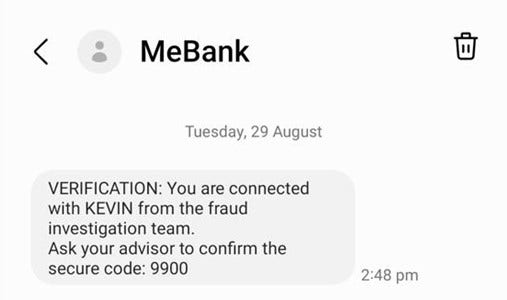
The caller will request you to provide your Customer ID and Access Code “secure your profile’’. The caller will advise that you will be sent a one- time passcode SMS and request you to quote the code over the phone. However, after you provide the one- time passcode the caller can access your internet banking which may result in unauthorised transactions.
What to look out for:
- The text message or caller may allude to a security compromise with your account but may struggle to provide any specific information.
- Urgency is emphasized so that the scammers can pressure you to provide your details or convince you to do something quickly.
- Callers informing you that your funds are not safe and request you to provide your Customer ID and Access Code to secure your profile.
How to protect yourself:
- Never provide sensitive information to anyone over the phone especially during a call that you did not initiate.
- Call a trusted number to confirm you are speaking with the organisation or company that says they are calling.
- If you receive an unexpected call or SMS, you should never click any links or provide any personal or banking information.
- Never provide your card information, internet banking details or a one-time passcode SMS over the phone.
- If directed to call your bank, always call ME on 13 15 63 or get in touch using the other details listed on our Contact Us page.
- If you think your account details or card details have been disclosed to a scammer, or if you receive a verification code that you didn't request, immediately contact ME on 13 15 63.
December 2022 – ME Bank Phishing Text Message.
We’ve been alerted to several phishing text messages that notify you that ME Bank has noticed an unusual payment from your account. The text message requests you to call +61390008776 if the transaction is not recognised, and it appears to come from the ME Bank user ID. The phone number provided takes you through to a scammer, who may ask you for your personal information, or to verify a One Time PIN sent to your mobile.
- If you receive an unexpected call or SMS requesting payment, never click the link in the message or provide card or account information
- Contact the company directly using a verified phone number or trusted channel to confirm the request
- Never share or disclose verification codes with a third party
If you think your account or card details have been disclosed to a scammer, or if you receive a verification code that you didn’t request, call ME on 13 15 63.
November 2022 – Online Shopping and Data Security.
Ahead of Christmas is the busiest time of the year for online shopping, with enticing deals linked to Black Friday, Cyber Monday and the festive season appearing in our inboxes and in the media.
Online shopping scams continue to be one of the most common threats to Australians. These scams carry significant risks, exposing individuals and businesses through fake product listings, payment requests and non-secure payment avenues.
The increased storage of personally identifiable information, including card details on sites visited at this time of year, continues to elevate the risk by exposing individuals and businesses to data hungry cybercriminals. Once they have your bank details, you’ll lose more than the goods you thought you purchased. You’ll also lose your identity and bank information.
What to look out for:
- Requests for payments via bank transfer or virtual currencies
- Links in emails asking for bank details or other information
- Emails and messages about items yet to be delivered, or a fee required to release a ‘failed’ delivery
- Inadequate information about privacy, conditions of use, dispute resolution or contact details
Protect yourself:
- Use secure devices, and avoid public wi-fi networks
- Protect your payment information and accounts – avoid saving your payment details to online shopping accounts
- Use trusted sellers
- Know the warning signs
- If you receive any suspicious emails or messages, don’t click any links or provide your card details
- Be wary of online shopping deals and discounts – if it looks too good to be true, it probably is
If you have any concerns about the legitimacy of correspondence, call ME on 13 15 63.
Report a cybercrime or cyber security incident to the ACSC via ReportCyber or call the Australian Cyber Security Hotline on 1300 CYBER1 (1300 292 371).
September 2022 – Online Security.
Scams and fraud can happen to anyone. That’s why our Financial Crimes Operations (FCO) team monitors customer accounts for any suspicious activity, like the recent Optus data breach.
For more information on the Optus data breach and what this may mean for you, see tips from the national identity and cyber support service, IDCARE.
Protect yourself:
- Don’t click on links within unsolicited text messages, emails or social media messages – go to directly the app or website by entering the correct details yourself
- When it comes to unknown phone calls, check the number and call the organisation directly using their legitimate details
- Update your passwords, using a strong password not used for other accounts
- Add two-factor authentication (2FA) to internet banking and personal accounts
- Monitor your transactions regularly, consider using PayID and review the payment transfer limits on your accounts
- Explore more online security fraud via reputable sources like Scamwatch, the Australian Cyber Security Centre (ACSC) and IDCARE
If your identity has been compromised, or to report a fraud or scam, call ME on 13 15 63.
September 2022 – Digital Wallet Phishing Scams.
We’ve received reports of scams involving an SMS message using the brand of well-known companies like Netflix and Linkt. These scams target customers to gain their personal information and card details by saying that your payment information needs to be updated, you have unpaid tolls, or your account has been suspended due to a payment failing.
The SMS contains a link to a legitimate looking website and prompts you to enter your card information. These details are being used to register the card information to a digital wallet on the mobile device of the scammer.
To complete the digital wallet registration, a verification code is sent via SMS. When this code is obtained by the scammer, they can successfully register the victim’s card to their own digital wallet and make purchases.
Protect yourself.
- If you receive an unexpected call or SMS requesting payment, never click the link in the message or provide card/account information
- Contact the company directly using a verified phone number or trusted channel to confirm the request
- Never share or disclose verification codes with a third party
If you think your account details or card details have been disclosed to a scammer, or if you receive a verification code that you didn’t request, call ME on 13 15 63.
August 2022 – Family Impersonation Scam via WhatsApp, Text-Message and Social Media.
There’s been an increase in reports where victims are being contacted by individuals claiming to be a family member requesting financial assistance to help pay invoices, outstanding bills or to repay debts.
These requests are being received via a range of popular messaging services where the sender advises they have recently changed phone numbers and to request you to delete and block their old number.
Once this has been completed, they will request you to provide or lend funds or even hand over login credentials to your internet banking.
As a recent publication from the Australian Communications and Media Authority explains: "These messages often begin with a "Hi Mum" and could provide several different reasons why they are using a different phone number including switching providers or having a lost or broken phone."
Protect yourself.
- If you receive a request similar to this, contact that family member via a trusted channel to validate the request
If you have any concerns about the legitimacy of any correspondence, or think you’ve paid money to a scammer, call ME on 13 15 63.
June 2022 – WhatsApp Impersonating Family or Children Scam.
A scam trend has emerged where you may be contacted via Whatsapp, SMS or other social media from individuals claiming to be family or children who are in urgent need of money.
Yahoo!News reports victims receiving messages stating, ‘Hi Mum’ or ‘Hi Dad’. The scammer then claims that their phone has been lost, stolen or damaged and the number they are contacting them on is their new contact number, and request their victim to save the new number.
The scammer, purporting to be a family member, may claim that they are in trouble with an authoritative figure such as the police, or that they have urgent payments or bills which they are unable to pay due to their phone being lost or broken. The scammer urgently requests the victim to make the payment on their behalf as soon as possible and that they will return the money promptly.
Protect yourself.
- Be cautious of all approaches you didn’t initiate, especially if you’re asked to send money online
- Messages requesting money may become more desperate, persistent, or direct – if you do send money, they continue to ask you to send more
- Do not respond to the contact unless you are 100% sure they’re genuine
- Confirm the identity of the contact by calling the supposed family member directly via a reliable or previously known contact number
- Don’t conduct any payments or transfers instructed by the third party until you have verbal confirmation over the phone from the intended recipient/family member
- Don’t provide your banking, debit or credit card details or your personal information to anyone over messages, especially on a message that you didn’t initiate
If you have any concerns about the legitimacy of any correspondence, or think you’ve paid money to a scammer, call ME on 13 15 63.
March 2022 – Scams Targeting Flood-Impacted Communities.
Fundraising appeals often occur in the aftermath of a disaster. Unfortunately, some of these are scams.
Scammers may pretend to be government agencies providing information on flood/disaster relief through text messages and emails ‘phishing’ for your information. These contain malicious links and attachments designed to steal your personal and financial information.
Scammers are also pretending to be government agencies and other entities offering to help you with applications for financial assistance or payments for disaster relief.
Protect yourself.
- Be cautious of all approaches you didn’t initiate, especially if you’re asked to send money online
- Confirm the identity of the contact by calling the organisation directly – don’t respond to the contact if you’re not 100% sure
- Don’t disclose personal information in a phone call, like sharing your bank account screen, reading out passwords, or providing personal information or login details to MyGov
- Trusted organisations will not ask for an upfront payment to process recovery payments – requests from Services Australia and government departments can be verified with a call to hotlines on their websites
- If you donate to an established charity or not-for-profit organisation, make sure it’s registered by searching through the Australian Charities and Not-for-profits Commission Charity Register
- Learn more from trusted resources like the National Emergency Management Agency
If you have any concerns about the legitimacy of any correspondence, or think you’ve paid money to a scammer, call ME on 13 15 63.
September 2021 – Apple iOS, macOS and Safari vulnerabilities.
Apple have identified two vulnerabilities in the operating systems of multiple devices (e.g. iPhone, iPad, Apple Watch, MacBook). This Australian Cyber Security Centre (ACSC) alert lists the operating systems affected.
Some vulnerable devices may be exposed to being infiltrated by hackers who can execute code to install malware or take other actions. All without the user clicking any links. This may enable criminals to steal personal data or interfere with, or compromise, banking services.
Protect yourself.
- Update your Apple mobile and laptop/personal computer devices immediately
- Setup automatic software updates on your mobile devices and laptops/personal computers
- Install reputable antivirus and anti-theft/loss protection software, only from official sources (like App Store or Google Play Store for mobile devices)
- On mobile devices, adjust settings to require a password before installing new applications
- Avoid letting your device automatically connect to new WiFi networks without confirmation
- Consider registering with the ACSC Alert Service
If you have any concerns of your banking services having been compromised, call ME on 13 15 63.